Documentation Menu
Private Mode
Keep sensitive content hidden from prying eyes with Private Mode.
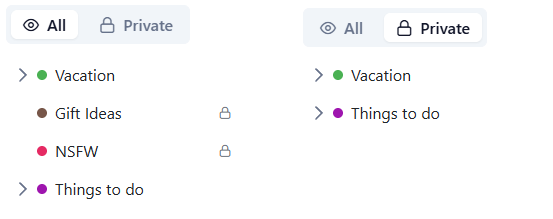
What is Private Mode?
Private Mode allows you to mark specific collections as "Protected". These collections are hidden from your main library view by default.
This is perfect for:
- Job Hunting: Keep job applications and salary research out of view while you share your screen at work.
- Gift Ideas: Hide wishlists so your partner doesn't accidentally see them.
- Personal Journals: Keep private notes secure.
Protecting a Collection
- Edit any collection.
- Toggle the Protected & Hidden switch.
- Save.
The collection will immediately disappear from your sidebar.
Accessing Hidden Content
To view your protected collections go to Settings and toggle between "All" and "Private".
Your hidden collections will appear and remain visible until you refresh the page or click "Hide Protected".