What's New
Every release, every improvement — all in one place. Updated with each new version.
- v1.26.0 Latest
Linkflare for Mac
Linkflare is now a native app on the Mac App Store, free to download. It opens your library in its own window, and it brings back the Safari extension: open the app once, then turn on Linkflare in Safari Settings > Extensions.
New
- Save pages and highlight text in Safari with the extension that comes with the app
- Subscribe to Pro inside the app, billed through your Apple ID
- v1.25.0
Save Every Open Tab at Once
The browser extension can now save every tab in a window in one go. Pick the tabs, send them to a new collection named after the date or to your Inbox, and close them on the way out if you like. The extension is now also available in German, French, Spanish, Portuguese and Italian.
New
- New "Save all N open tabs" button in the extension popup. It lists the window's tabs, all ticked, so you can untick the ones you don't want
- Saved tabs go into a new collection named after the date and time, which you can rename, or into your Inbox
- Tick "Close saved tabs" and, when the save is done, every tab whose page is now in Linkflare closes. Pinned tabs and tabs that didn't save stay open
- Right-click the Linkflare icon in the toolbar and choose "Save all tabs in this window" to save them all without opening the popup
- Pages you already had in Linkflare aren't saved again, so their collection, tags and notes stay as they were
- The whole extension now follows your browser's language: English, German, French, Spanish, Portuguese or Italian
- v1.24.0
Turn Your Week Into One Shopping List
Plan the week, press one button, and every ingredient from every recipe on it arrives as a single list, added up and sorted into supermarket aisles. Each line names the recipes it came from, so you can see where a number came from before you buy it.
New
- New Grocery list button in the meal planner: on the week row on a computer, next to Share on a phone
- Every ingredient from the week is added up into one line, grouped by the aisle you will find it in
- Each line names the recipes behind it, with the amount each one asked for
- Metric or US units, switchable while you are standing in the shop
- Tick things off as you go. Your ticks are remembered on that device for that week
- Copy the list as plain text, or download it as a .txt file, and shop from whatever app you already use
- Amounts a recipe never gave, like salt to taste, stay on the list without a number instead of being dropped or guessed at
- Free on every plan, like the rest of the meal planner
- v1.23.0
Organize Your Library With One Thumb
Moving a bookmark to a collection, tagging it, or setting a reminder used to mean opening the edit dialog. Now it is a gesture. Long-press any card — or tap its ⋮ button — for a quick-actions sheet, or swipe to fire a single action instantly. You choose what each swipe direction does, and almost everything can be undone from the toast, so you can move fast without second-guessing yourself.
New
- Long-press a bookmark card, or tap its ⋮ button, to open a quick-actions sheet: Move to collection, Edit tags, Pin to top, Move to Inbox / Archive, Remind me, rate it, Share, Open link, Edit and Delete
- Articles also offer Read article and See summary, videos Watch video, and vaulted links View Vault version — all from the same sheet
- Swipe a card left or right to run one action instantly — a colored panel shows which one, and grows once you have pulled far enough for it to fire
- Pick what each direction does in View Settings: Archive / Move to Inbox, Delete, Pin / Unpin, Remind me, the quick-actions menu, or nothing at all
- Remind me comes with one-tap presets — Later today, Tomorrow, This weekend, Next week — or a date and time of your choice
- Right-click a card on the desktop to get the same quick actions
Improved
- Reversible actions now show an Undo button for a few seconds instead of interrupting you with a confirmation dialog — only Delete still asks
- Swiping right on a bookmark outside the Inbox moves it into the Inbox, instead of doing nothing as it did before
- The archive and delete animations are about three times faster, and are skipped entirely when your device has reduced motion turned on
- Long-press is also the quickest way into multi-select — the sheet opens with the card already picked
- v1.22.0
Take Your Highlights Anywhere
Every passage you've ever highlighted now exports to Markdown in one click — grouped by source page, notes included, ready to drop into an Obsidian vault. Free on every plan, because your highlights are yours.
New
- New Export button on the Highlights page downloads your whole library as a single dated Markdown file
- Grouped by source page with a link back to the original article, each passage as a blockquote with its note and highlight date
- Obsidian-ready — also opens cleanly in Logseq, Bear, iA Writer, VS Code, or any Markdown editor
- Searching first? The export contains exactly the highlights you are looking at
- Free for everyone — no Pro subscription, no support ticket, no lock-in
- v1.21.0
Let Your AI Assistant Quiz You
Linkflare's AI assistant integration goes far beyond bookmarks. Your assistant can now run a spaced-repetition study session on your knowledge cards, search everything you've highlighted while reading, manage your RSS subscriptions, and browse the public Discover directory — ten new abilities on the same connection you already set up, no reconfiguration needed.
New
- Say "quiz me" and your assistant pulls the knowledge cards due today, asks one at a time, and records how you did so Linkflare reschedules each card (Pro)
- Ask "how many cards are due?" to check your study backlog without opening the app (Pro)
- Search and summarize your highlights in chat — "What did I highlight about spaced repetition this month?"
- Manage RSS subscriptions in conversation: see what you follow, subscribe to a new blog, or unsubscribe (already-saved posts are kept)
- Browse Linkflare's public Discover directory for curated collections and knowledge topics without leaving the chat
- Two ready-made prompts to start from: a guided review session, and a highlight digest that pulls the themes out of what you've been reading
Improved
- Search results from your assistant now include each bookmark's ID, so follow-ups like "open the second one" or "move that to Recipes" just work
- v1.20.0
See Where to Stream Your Movies
Saved a movie or show? Linkflare now shows where you can watch it. Tell Linkflare your country and which streaming services you have, and every movie and TV bookmark shows at a glance whether it's on one of your services — or where else you can stream, rent, or buy it. Streaming data by JustWatch.

New
- Movie and TV bookmarks show a streaming badge — green with a check when the title is on a service you already pay for
- Set your country and streaming services once in Profile Settings, then every card updates instantly
- Open any title for the full "Where to watch" breakdown — stream, rent, and buy options with provider logos
- Click a provider to jump to its watch page and continue on to Netflix, Prime Video, Disney+, and more
- Free for everyone — no Pro subscription needed
- Your services and availability stay private to you — never shown on public, shared, or embedded collections
- v1.19.0
Listen to Your Articles
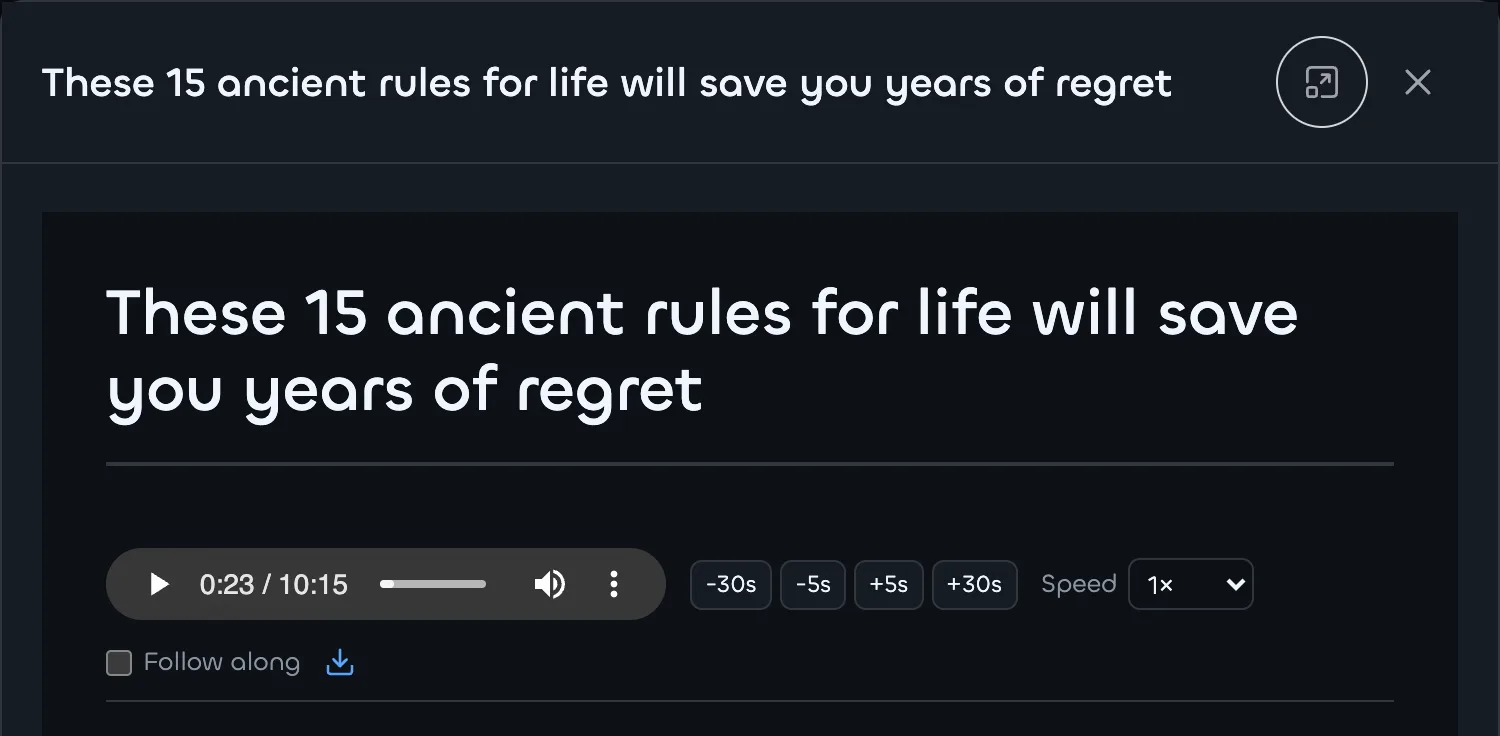
Out of time to read? Turn any saved article into audio and listen on the go. Everyone gets a free built-in voice; Linkflare Pro adds a natural, higher-quality HD narration you can scrub, speed up, download, and keep playing in the background.
New
- New "Listen" button on every saved article — hear it read aloud instead of reading
- Free for everyone using your device's built-in voice, with no setup
- Pro unlocks a natural HD voice that sounds the same on every device and is downloadable
- Full playback controls: play/pause, scrub, change speed, and skip ±5s / ±30s
- Optional "Follow along" mode highlights and auto-scrolls to the paragraph being read
- The player stays pinned below the title as you scroll, so the controls are always in reach
- v1.18.0
Linkflare in your language
Linkflare now speaks your language. The app and website are available in six languages — English, German, French, Spanish, Portuguese, and Italian — so you can save, organize, and learn in the language you think in.
New
- App interface translated into German, French, Spanish, Portuguese, and Italian, in addition to English
- Marketing website translated into all six languages, with localized, human-readable URLs (e.g. /de/preise/, /fr/tarifs/)
- Linkflare follows your account language automatically — pick it at sign-up or change it anytime in Profile Settings
- Dates and numbers display in your local format
- Switch the website language anytime from the new language picker in the footer
- v1.17.0
Public Knowledge Library
Discover and learn from a growing library of curated, publicly shared knowledge bases — no account required. Browse hand-crafted topics like Mental Models for Better Thinking, Cognitive Biases, The Human Body, and Personal Finance Fundamentals — each one a tree of bite-sized cards you can read, share, and embed.
New
- New public knowledge library at /discover/knowledge — every publicly shared knowledge base in one place
- Curated starter topics spanning thinking, science, health, art, food, and money — each a self-contained, read-only wiki
- Open any topic and read the entire card tree right in your browser, no sign-up needed
- Every public knowledge base gets a clean, shareable URL and can be embedded on your own site
- Discoverable alongside public collections and saved searches, with search and sorting
- v1.16.0
AI Article Summaries
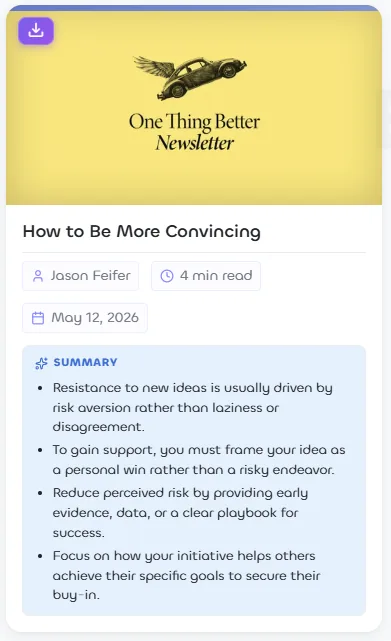
Linkflare Pro now summarizes every article you save into 3–4 bullet points using a fast, low-cost AI model. Summaries are generated automatically in the background when you save an article, and appear in a box at the top of the reader, behind a "See summary" item in the bookmark menu, and — if you turn it on in View Settings — inline on your article cards.
New
- Automatic 3–4 bullet summaries for article bookmarks, in the article's own language
- Summary box at the top of the in-app article reader
- "See summary" in the bookmark ⋯ menu opens the bullets in a popup
- Optional "Article Summary" view setting shows the bullets inline on article cards
- Generated in the background at save time — never slows down saving, and skipped during large imports
- Pro feature
- v1.15.0
Share highlights as beautiful images
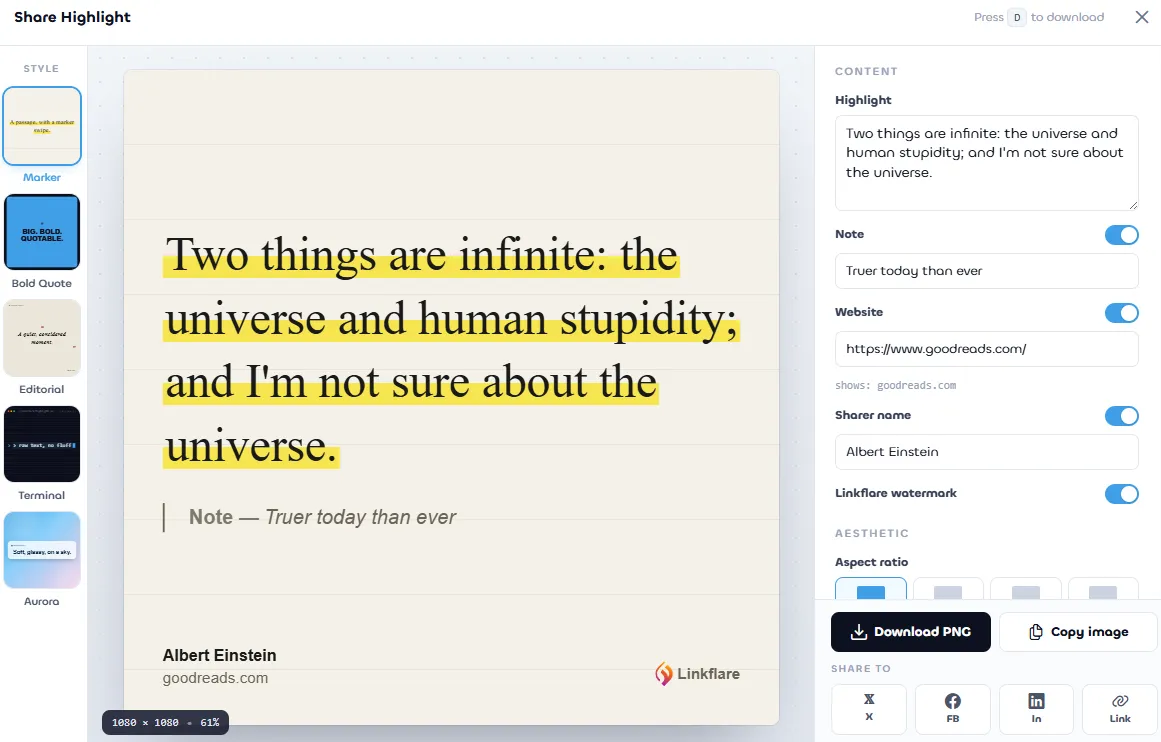
Every highlight on the Highlights page now has a share icon. Click it to open a full-screen editor that turns the quote, optional note, source domain, and your name into a polished social-share card — five distinct templates, five palettes each, four social aspect ratios, downloadable as a high-resolution PNG or copyable straight to your clipboard.
New
- Five visual templates: Marker (highlighter swipe), Bold Quote (loud sans), Editorial (magazine serif), Terminal (monospace with a fake CLI header), and Aurora (glassy gradient)
- Five curated color palettes per template — paper/cream/mint/rose/sky on Marker, midnight/sky/noir/plum/lime on Bold Quote, and so on
- Four social aspect ratios — 1:1 (Instagram feed), 4:5 (Instagram portrait), 9:16 (Stories / Reels / TikTok), 16:9 (X / LinkedIn)
- Toggle the note, website domain, sharer name, and watermark independently
- Fine-tune font size and padding for very short or very long passages
- Terminal template lets you edit the file-path and date in its header bar per highlight
- Download high-resolution PNG, copy the image to your clipboard, or open X / Facebook / LinkedIn pre-filled with the quote
- Settings persist per highlight so re-opening the editor restores your last configuration
- Linkflare Pro removes the Linkflare watermark on exported cards
- v1.14.0
Highlights — Mark up the web
Highlight any passage on any page in one of six colors, attach notes, and find every mark from a dedicated Highlights page. Highlighting a page that isn't saved yet auto-creates the bookmark, so you never lose context.
New
- Select text on any web page and save it as a colored highlight via the browser extension
- Six colors to organize highlights by theme, importance, or mood
- Attach an optional note to capture why a passage matters
- Highlights re-render in place the next time you visit the page
- New /highlights page lists every passage you've ever marked, fully searchable across text and notes
- Auto-bookmark — highlighting a page that isn't saved yet creates the bookmark for you (skipping the inbox)
- v1.13.0
Knowledge Management — Spaced Repetition & AI Flashcards
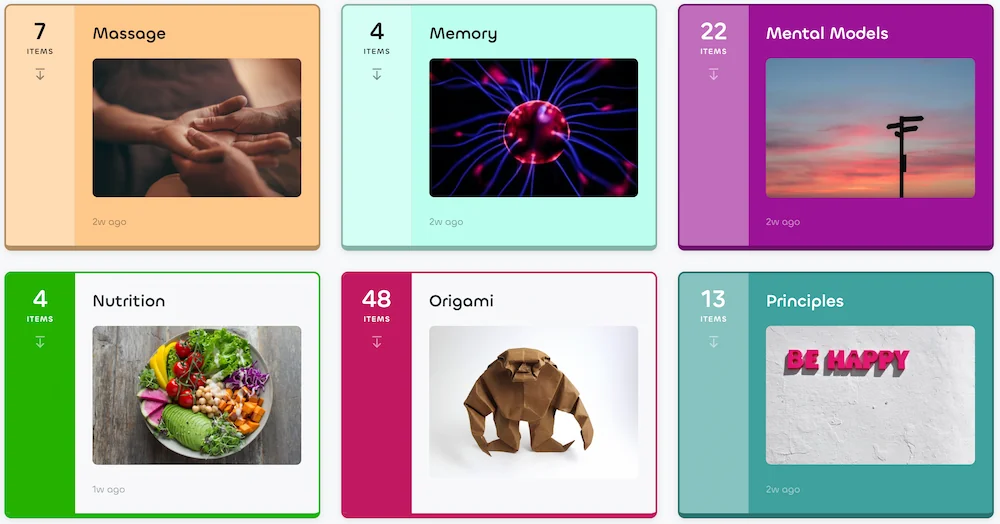
Your knowledge base, supercharged. Hierarchical knowledge cards with rich content (text, images, drawings, videos), an SM-2 spaced repetition system that resurfaces due cards in the app, your new tab, and email — plus an AI flashcard maker that turns any card into a study-ready question.
New
- Hierarchical knowledge cards with tags, color coding, and rich content (images, drawings, embedded videos)
- SM-2 spaced repetition algorithm — mark any card "memorizable" and review it right before you would forget
- AI flashcard maker generates front/back questions from card content in one click
- Review due cards in the app, in the browser extension new tab, or via an email digest (only when cards are due)
- Publicly shareable knowledge cards — share a single card or a whole tree via a read-only public URL
- Customizable view settings: grid, list, and moodboard layouts, column count, visible fields, sorting, tag filters
- Fulltext search across every card title and body
- v1.12.0
Safari Extension
Linkflare is now available as a native Safari extension included with the Linkflare Mac app. Save bookmarks and use keyboard shortcuts without leaving Safari.
New
- Native Safari extension available on the Mac App Store
- One-click saving and keyboard shortcuts, same as Chrome, Firefox, and Edge
- Safari auto-detected in onboarding and empty states so you get the right install link instantly
- v1.11.0
Price Alerts & Notification Center
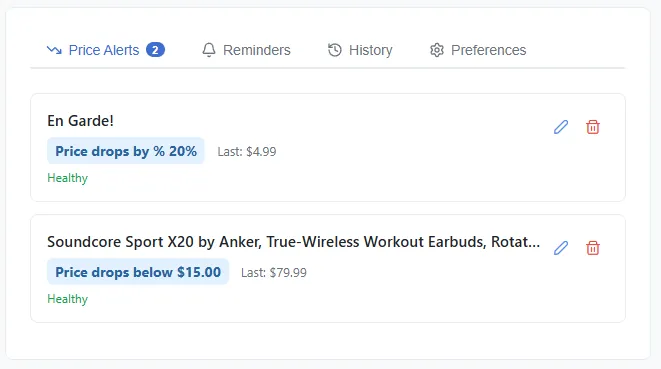
Never miss a deal again. Set price alert rules on any bookmarked product or game, and get notified by email when the price drops, rises, or changes — all managed from a new central Notification Center.
New
- Set price alerts on any bookmark with a price — products, games, and more
- Four alert rules: price drops below, rises above, drops by a percentage, or any change at all
- Email digest when your alerts trigger — with product image, old vs. new price, and a direct link to buy
- Notification Center with tabs for Price Alerts, Reminders, History, and email Preferences
- Price alert icon on bookmark cards so you can spot tracked items at a glance
- Works with Amazon, Steam, eBay, and thousands of stores with standard product markup
Improved
- Alerts auto-deactivate after repeated fetch failures so stale alerts don't pile up
- Multiple alerts on the same product share a single price check to keep things fast
- v1.10.0
Public Pages & Pretty URLs
Public collections and saved searches now get beautiful, human-readable URLs, rich social previews, RSS feeds, and a public profile page — making your curated lists truly shareable.
New
- Pretty URLs: public pages use /@username/collection-slug instead of random IDs
- Public profile page at /@username showing all your public collections
- RSS feeds for every public collection and saved search
- Social share menu: share to Twitter, Facebook, LinkedIn, Reddit, or copy links
- Rich social previews when sharing links on Twitter, Facebook, and other platforms
- Shareable view customisation via URL parameters (search, sort, view mode, columns)
- Public view analytics tracking
Improved
- Improved accessibility on public pages
- Share dialog now includes an editable URL slug field
- v1.9.0
AI Assistant Integration (MCP)
Connect Linkflare to ChatGPT, Claude Desktop, and other AI assistants so you can search, organize, and add bookmarks directly from your assistant.
New
- Search your bookmarks, add links, and manage collections and tags — all from your AI assistant
- Works with ChatGPT, Claude Desktop, and any MCP-compatible AI tool
- Simple one-time setup with built-in sign-in flow for ChatGPT
- API key support for running your own AI setup
- v1.8.0
Embed Collections & Saved Searches
Embed your curated bookmark lists on any website. The embed generator builds fully customisable widgets with a live preview, theme selection, field toggles, and built-in analytics.
New
- Multiple embed styles to suit any site layout
- Light, Dark, and Auto themes
- Grid, Moodboard (masonry), and List view modes with adjustable column count
- Toggle individual card fields: title, URL, image, date, tags, link type, metadata, and notes
- Hide header, search bar, or sorting dropdown independently
- Quick field presets: All, Minimal, and Image Only
- Embed analytics with total views and referrer breakdown (Pro)
- Password-protected embeds with inline unlock form
- Paste your Linkflare link in WordPress, Medium, or Notion for an instant embed
- Embeds automatically resize to fit your content — no more fixed-height boxes
- "Powered by Linkflare" branding (removable on Pro)
- v1.8.0
New Tab Dashboard
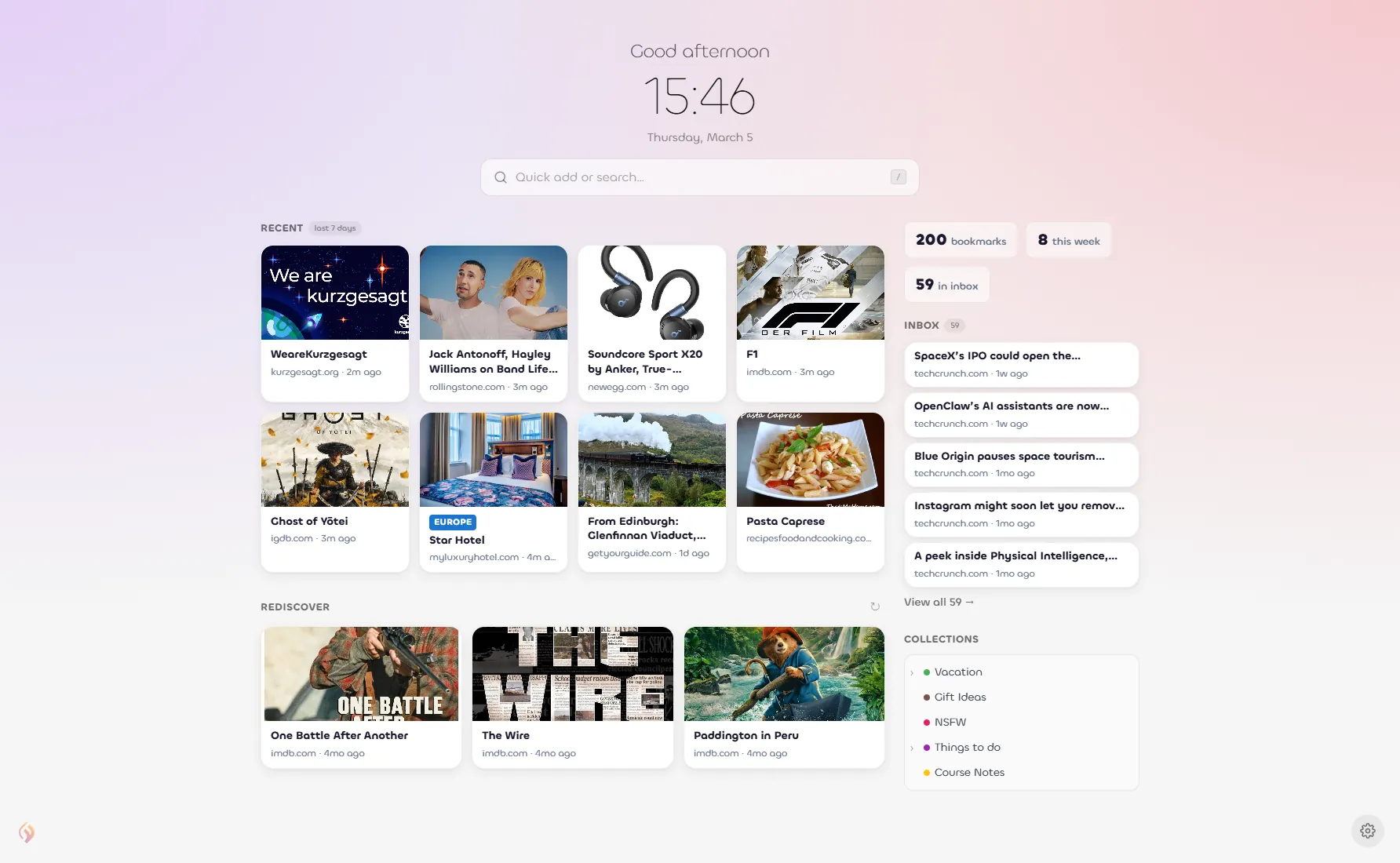
Turn every new tab into your personal Linkflare dashboard. See your recent bookmarks, inbox, collections, and stats the moment you open a new tab.
New
- Dashboard layout with clock, quick add/search, recent bookmarks, inbox, stats, collections, and Rediscover
- Minimal layout for a clean, focused new tab with just clock, search, and Rediscover
- Choose from curated gradient backgrounds or upload your own custom image
- Light, Dark, and Auto (system) themes
- Toggle individual sections on or off
- 24h / 12h clock format
- Adjustable overlay darkness for readability over any background
- v1.7.0
Collection Collaboration
Invite other Linkflare users to collaborate on your collections. Three permission levels let you control exactly what collaborators can do.
New
- Invite collaborators by email with View, Add, or Full permission
- Child collections automatically inherit collaborators from their parent
- In-app notification bell for pending invitations
- Accept or decline invitations via email link or in-app
- "Shared with me" sidebar section for collections others share with you
- Collaboration icon on collections that have active collaborators
- Buttons and actions adapt based on your role in a shared collection
Improved
- Collection settings now include a Collaborate tab for managing team access
- Context menu shows "Leave" for shared collections instead of Edit/Delete
- v1.6.0
Bulk Import from Pocket, Instapaper, Goodreads & YouTube
Migrate from your existing tools with zero friction. We now support direct imports from four new sources.
New
- Import bookmarks from Pocket HTML exports
- Import bookmarks from Instapaper CSV exports
- Import book lists from Goodreads CSV exports
- Import subscriptions & watch history from YouTube (Google Takeout)
- v1.5.0
Dashboard & Stats Page
Get a bird's eye view of your entire library with the new Dashboard — beautiful charts, stats, and insights about your bookmarking habits.
New
- Total bookmark count, weekly/monthly growth charts
- Bookmark breakdown by type (pie chart)
- Most-used tags bar chart
- Recently rated bookmarks and quick add widget
- v1.4.0
Onboarding Flow for New Users
New users now get a guided first-run experience that explains core concepts and gets the library set up in minutes.
New
- Step-by-step interactive tutorial for new accounts
- Explains Inbox vs Bookmarks concept
- Guides through browser extension install
- Prompts to import from existing tools
- v1.3.0
Keyboard Shortcuts
Speed up your workflow with a full suite of keyboard shortcuts. Press ? anywhere to see the complete reference.
New
- N — Add bookmark, D — Add feed subscription, F — Focus search
- S — Toggle sidebar, I — Toggle inbox, X — Selection mode
- G+B / G+F / G+T / G+R — Navigate between sections
- ? — Show shortcut help overlay
- v1.2.0
Collection Tree & Drag-and-Drop
Collections now support a full tree layout with drag-and-drop reordering and color / icon customisation.
New
- Nested collection tree sidebar
- Drag-and-drop to reorder or reparent collections
- Icon and color picker for collections
Improved
- Faster sidebar rendering
- Improved collection hover menu
- v1.1.0
Custom Metadata & Presets
Define your own metadata fields for any bookmark type, and save them as reusable presets.
New
- Add custom metadata fields to any bookmark
- Save field configurations as named presets
- Apply presets with one click to new bookmarks
- v1.0.0
Linkflare Release
The first public release of Linkflare — a powerful new bookmark manager designed for the modern web.
New
- New design system with light & dark modes
- PWA support — install on any device
- Browser extension for Chrome, Edge, and Firefox
- Reader Mode with offline support
- Linkflare Vault — permanent snapshots of saved pages
Want features shipped faster?
Upgrade to PRO to support development and unlock unlimited bookmarks, feeds, and more.
Get Started Free