Documentation Menu
Smart Filters & Sorting
Linkflare adapts its filtering and sorting options based on the type of content you are viewing, so you always have the most relevant controls at your fingertips.
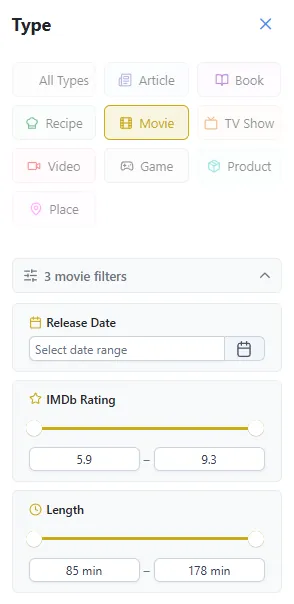
Smart Filters
When you select a specific content type (e.g. Recipes, Movies, or Products), a set of type-specific range filters appears in the sidebar. These filters let you narrow your library by the metadata that matters most for that type.
How It Works
- Select a bookmark type from the type filter (e.g. Recipe, Movie, Product).
- The Smart Filters panel appears in the sidebar, showing the relevant attributes for that type.
- Use the sliders or number inputs to set a minimum and maximum range.
- Your library updates instantly to show only bookmarks matching the filter criteria.
Filter Types by Content
- Recipes: Filter by Calories, Cooking Time, Prep Time, and Servings.
- Movies: Filter by IMDb Rating, Runtime, and Release Year.
- Products: Filter by Price to find items in your budget.
- Books: Filter by Page Count and Publication Year.
- Videos: Filter by Duration to find something the right length.
Combining Filters
You can apply multiple filters at the same time. For example, filter your recipes to only show meals under 500 calories that take less than 30 minutes to cook. Each filter narrows the results further, making it easy to find exactly what you need.
Use the reset button next to each filter to clear it individually, or use Clear All to remove all filters at once.
Smart Sorting
Alongside smart filters, Linkflare offers context-aware sorting. When you filter your library by a specific content type, new sorting options become available that are relevant to that type.
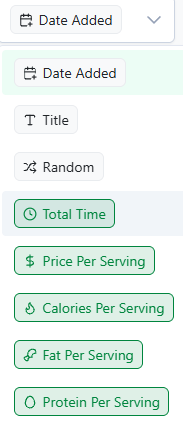
Sorting Examples
- Movies: Sort by IMDb Rating to find the best movies to watch.
- Recipes: Sort by Calories or Cooking Time to find a quick or healthy meal.
- Products: Sort by Price to find the best deals.
- Videos: Sort by Duration to find something short to watch.
- Books: Sort by Page Count or Publication Date.
Filters + Sorting = Powerful Discovery
The real power comes from combining filters and sorting. Filter your product bookmarks to show only items under $50, then sort by price to see the cheapest first. Or filter your movie list to highly-rated films and sort by release year to watch the newest first.
This makes it incredibly easy to find exactly what you need, when you need it. No more digging through a generic list sorted only by "Date Added".