Documentation Menu
Price Alerts
Linkflare can monitor prices on any bookmark that has a price — typically Product and Game bookmarks. Set a rule, and we'll notify you when the price changes the way you care about.
Pro feature: Price Alerts are available on the Pro plan. Free users can see the price alert UI but will be prompted to upgrade when enabling an alert.
How It Works
When you save a link from an online store (Amazon, eBay, Steam, etc.), Linkflare automatically extracts the product's price and currency. You can then set alert rules on that bookmark. Linkflare checks prices hourly and notifies you by email when your rule triggers.
- Save a product or game link — Linkflare detects the price automatically.
- Set an alert rule — choose what kind of price change matters to you.
- Get notified — receive an email digest when the price matches your rule.
Alert Rule Types
You can choose from four rule types when setting up a price alert:
| Rule | Description | Example |
|---|---|---|
| Price drops below | Triggers when the price falls below your threshold. | Alert me if the price drops below $50. |
| Price rises above | Triggers when the price exceeds your threshold. | Alert me if the price goes above $100. |
| Price drops by % | Triggers when the price drops by a certain percentage from the price at the time the alert was created. | Alert me if the price drops by 20%. |
| Any price change | Triggers whenever the price changes at all. | Alert me on any price movement. |
Setting Up a Price Alert
You can add a price alert when creating or editing a bookmark that has price data.
- Open the Add Bookmark or Edit Bookmark dialog for a link with a price (usually a Product or Game).
- Scroll to the Price Alert section below the reminder toggle.
- Toggle the price alert switch on.
- Select a rule type from the dropdown (e.g. "Price drops below").
- Enter a threshold value (not needed for "Any price change").
- Save the bookmark.
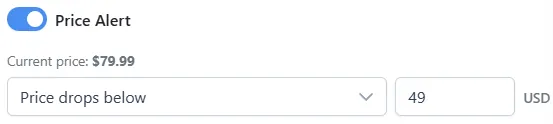
The current price and currency are displayed in the alert section and locked to the value from the bookmark's metadata — you don't need to enter them manually.
Visual Indicators
Bookmarks with an active price alert are easy to spot in your library.
- A green price trend icon appears on the bookmark card's image, indicating an active price alert.
- If the bookmark also has a reminder, both icons are shown side by side without overlapping.
Managing Price Alerts
You can manage all your price alerts from the Notification Center.
Notification Center
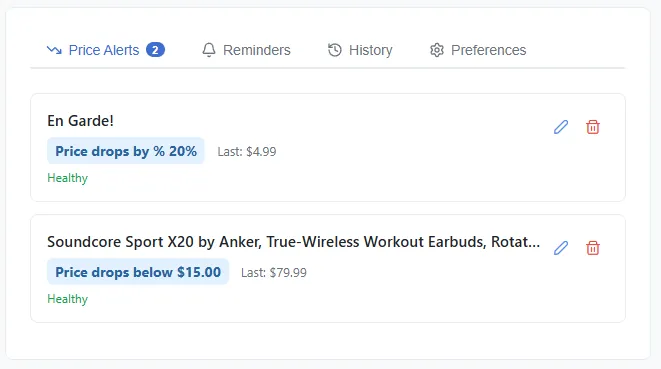
Navigate to the Notifications page (bell icon in the navigation bar) to see a central hub for all your alerts and notifications. It has four tabs:
- Price Alerts — view, edit, and delete your active price alerts.
- Reminders — see upcoming reminders with links to the bookmarks.
- History — a log of past notifications with relative timestamps.
- Preferences — control email notifications: price alert emails, product updates, and tips.
Editing an Alert
To change a price alert rule or threshold:
- From the bookmark: Open the edit dialog and update the Price Alert section.
- From the Notification Center: Go to the Price Alerts tab, find the alert, and edit it inline.
Removing an Alert
To remove a price alert:
- From the bookmark: Open the edit dialog and toggle the price alert switch off.
- From the Notification Center: Go to the Price Alerts tab and delete the alert.
Email Notifications
When a price alert triggers, you receive an email digest summarizing all triggered alerts for that check. The email includes:
- The product name and image.
- The previous price and the new price.
- A direct link to the product page so you can act on the deal immediately.
You can toggle price alert emails on or off in the Preferences tab of the Notification Center.
Supported Sources
Price alerts work on any bookmark that has price metadata. Linkflare extracts prices from:
- Amazon — full ASIN-based price lookups for maximum accuracy.
- Steam & game stores — great for tracking game sale prices.
- Any site with schema.org product markup — eBay, Walmart, Best Buy, Etsy, and thousands of other stores.
Automatic Deactivation
If Linkflare is unable to fetch the price for a bookmark after 5 consecutive checks, the alert is automatically deactivated. This prevents stale alerts on pages that have been removed, restructured, or blocked price fetching. You can re-enable the alert at any time from the Notification Center.
FAQ
Which bookmark types support price alerts?
Any bookmark that has a price in its metadata. This is most common with Product and Game type bookmarks, but any bookmark with a price field is eligible.
How often are prices checked?
Prices are checked once per day. If multiple alerts point to the same URL, the price is only fetched once to minimize load.
Can I set price alerts on free-plan bookmarks?
You can see the Price Alert section in the bookmark editor, but toggling it on will prompt you to upgrade to Pro. Price alerts are a Pro-only feature.