Best Padlet Alternatives in 2026
Padlet is the fastest way to put a wall of resources in front of a class, and it is genuinely good at that. What it is not is a library: three boards on the free plan, no reading mode, and no way to search everything you have ever saved. Linkflare is the Padlet alternative for the half Padlet does not do. Here is how the two compare and the best Padlet alternatives in 2026.
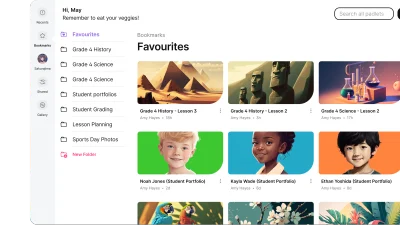
What is Padlet?
https://padlet.com/Padlet is a collaborative board where a class or team posts links, files and media onto one shared wall.
Padlet turns a web page into a shared bulletin board. You create a padlet, pick one of nine formats (Wall, Grid, Columns, Table, Freeform, Rows, Timeline, Stream or Map), and everyone you send the link to can drop in posts containing links, uploads, drawings and recorded audio or video, live and without signing up. That posting model is why it took hold in education: a teacher can put up a board of resources in minutes, students add to it during the lesson, and the whole board becomes a slideshow with one click. Boards export as an image, PDF, CSV or Excel file, and there are apps for web, iOS, Android, Mac, PC and Chromebook alongside the Padlet Mini browser extension. The limits appear when a padlet stops being a lesson and starts being your library: the free plan allows three boards with 20MB uploads, there is no reading mode, no offline archive, and no way to search across everything you have ever saved.
Why look for Padlet alternatives?
The usual trigger is the ceiling: the free plan allows three padlets with 20MB uploads, and unlimited boards start at €15/month. The deeper reason is that a padlet is a wall, not a library. Once a board is full there is no reader, no offline copy, no tags spanning boards and no search of the pages behind your links. Teachers who want those links to still be findable next term end up looking for something that stores as well as it displays.
Linkflare vs Padlet
| Feature | Linkflare | Padlet |
|---|---|---|
| Platforms | Web, Mac app, desktop PWA, iOS, Android, and extensions for Chrome, Edge, Firefox & Safari | Web, iOS, Android, Mac, PC & Chromebook apps, plus the Padlet Mini browser extension |
| Content types | Articles, videos (with transcripts), PDFs, books, movies, recipes, products, places & games | Posts on a board: links, uploads, drawings, plus recorded audio & video |
| Reading mode | Distraction-free reader with themes, fonts & offline access | No reader view: posts link out to the original page |
| Organization | Hierarchical tags, collections, saved smart filters & full-text search | Boards in nine formats (Wall, Grid, Columns, Table, Freeform, Rows, Timeline, Stream, Map) |
| Beyond bookmarking | Trip planning with maps, meal planning, movie-night voting, shared wishlists, knowledge cards & spaced-repetition review | Real-time group posting, comments, reactions & one-click slideshow |
| Pricing | Generous free tier; Pro under $5/month | Free: 3 padlets & 20MB uploads. Platinum €15/month or €120/year; Classroom €160/year for 2 teachers |
| Data export | One-click export of your whole library: every link as CSV, knowledge cards as JSON | Per board, as an image, PDF, CSV or Excel file |
Best Padlet Alternatives
- 1

Linkflare is the universal bookmark manager that goes beyond saving links. It helps you consume, plan, and act on your saved content with smart metadata for books, movies, recipes, and more. Features include trip planning with map views, meal planning, movie night voting, shared wishlists, distraction-free reading, and hierarchical tags. Available on every platform with browser extensions, mobile apps, and a PWA for desktop.
Try Linkflare Free - 2
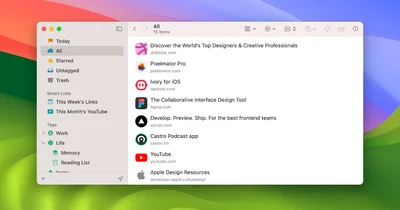
Anybox is a native Apple bookmark manager for Mac, iPhone, and iPad with powerful organization through nested tags, smart lists, iCloud sync, and Quick Find overlay. Users can archive bookmarks as PDFs or web archives and automate workflows via Siri Shortcuts, AppleScript, and integrations with Raycast and Alfred. Privacy is guaranteed as all data syncs via iCloud with no personal data collection.
Visit Anybox - 3
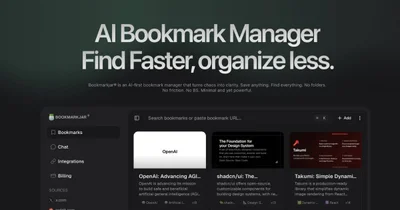
Bookmarkjar is an AI-first bookmark manager that drops folders in favor of automatic summaries, auto-tagging and semantic search. Every link you save gets a short AI summary and tags, and you find it again by asking in plain language. It also pulls in saves from X, Reddit and GitHub, and runs an MCP server so assistants like Claude and ChatGPT can query your library directly.
Visit Bookmarkjar - 4

Diigo is a research-focused bookmarking platform that combines link saving with web annotation, sticky notes, and collaborative group sharing for over 9 million users. It lets you highlight text directly on any web page or PDF and leave persistent sticky notes visible on future visits. Its Outliner feature structures research into organized knowledge bases, making it popular in academic and professional settings.
Visit Diigo - 5
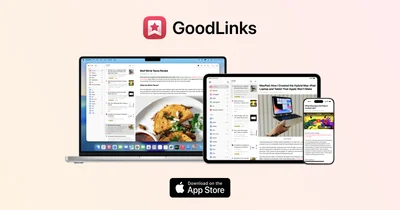
GoodLinks is a premium native Apple read-later and bookmarking app for Mac, iPhone, and iPad with a beautiful distraction-free reader, color-coded highlighting, and iCloud sync. Purchased once from the App Store, it provides lifetime access with a year of feature upgrades included. GoodLinks is completely private, with no user tracking or data sharing of any kind.
Visit GoodLinks - 6

Instapaper is one of the original read-later apps, allowing users to save any web content with one click for distraction-free offline reading on any device. It strips away ads and clutter from saved articles, delivering a clean reading experience with adjustable fonts and sizes. Highlights and comments let users capture key passages for future reference.
Visit Instapaper - 7
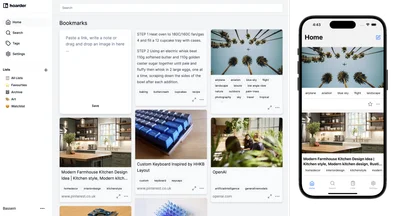
Karakeep is an AI-powered bookmark manager built for data hoarders, with automatic tagging, RSS feed auto-ingestion, self-hosting via Docker, and collaborative shared lists. It supports saving links, notes, images, and PDFs, all with full-text search for instant retrieval. With over 22,000 GitHub stars, it has become a beloved open-source tool in the personal knowledge management community.
Visit Karakeep - 8
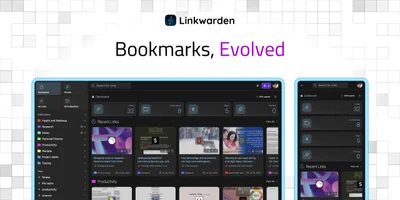
Linkwarden is an open-source bookmark manager built around full-page preservation, saving every link as complete HTML, screenshots, and PDFs to prevent link rot permanently. A dedicated reader view supports text highlighting and annotations for distraction-free content consumption. AI-powered automatic tagging, RSS feed subscription, and collection sharing make it a powerful all-around bookmarking platform.
Visit Linkwarden - 9
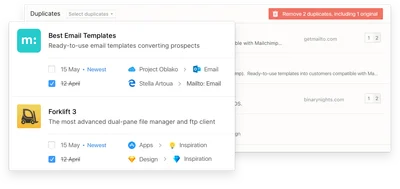
Raindrop.io is a polished all-in-one bookmark manager designed for creatives and coders alike, featuring collections, tags, full-text search across saved pages, and permanent page preservation. It offers highlights, instant in-app content previews, and cross-platform access on web, desktop, and mobile. With a generous free tier and a clean open-source ethos, it has become one of the most popular bookmark managers available.
Visit Raindrop.io - 10

Readwise helps readers retain and revisit ebook and article highlights using spaced repetition, syncing highlights from Kindle, Instapaper, iBooks, and more into one place. Daily email digests resurface your best highlights at the right intervals, helping build lasting knowledge over time. Deep integrations with Notion, Evernote, Obsidian, and Roam Research make it a central hub for any knowledge management workflow.
Visit Readwise - 11
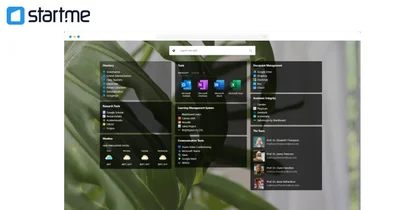
Start.me is a customizable browser start page that centralizes bookmarks, live RSS feeds, and over 50 widgets in one personalized productivity dashboard. Used by over 350,000 people and teams, it replaces the browser's new tab with an organized hub for all daily web tools. Teams can collaborate in real time on shared pages, and the platform is popular in OSINT, education, and cybersecurity research communities.
Visit Start.me - 12
Symbaloo is a visual start page that turns bookmarks into a grid of clickable tiles grouped into themed webmixes. Schools and libraries use it as a class homepage, because a published webmix can be embedded on a site or set as the new tab for a whole cohort. It claims over 18 million users, and its free tier is ad-supported.
Visit Symbaloo
Ready to try the best Padlet alternative?
Linkflare goes beyond bookmarking. Plan trips, share wishlists, organize recipes, and never lose a link again. Get started for free today.
Frequently Asked Questions
Is Linkflare a good Padlet alternative?
What is the best free Padlet alternative?
Can I move my Padlet boards into Linkflare?
Padlet vs Linkflare for teachers: which should I use?
More on bookmark management
Bookmark Manager: The Complete Guide to Organizing Your Links
Open tabs pile up faster than anyone reads them. A bookmark manager saves those links, sorts them and finds them again months later. Here is how to set one up.
Free Bookmarks HTML Viewer
Open, inspect, deduplicate and convert a browser bookmarks export without uploading it.
Best Bookmark Managers in 2026
We tested more than 20 bookmark managers and picked the ones worth using in 2026, with notes on who each one suits best.
AI Bookmark Manager: What AI Actually Does in 2026
Nearly every bookmark manager claims to be AI-powered. Here is what AI genuinely does today: metadata extraction, classification, summaries, tagging, dedup and semantic search. What is hype, and how to test a claim in fifteen minutes.