Best GoodLinks Alternatives in 2026
GoodLinks is a beautiful, fast, native read-later app, if you live entirely on Apple devices. There is no Android or true web app, and it is built for a single reader rather than cross-platform, shareable, multi-type use. Linkflare is the GoodLinks alternative for people who need their library everywhere. Here is the comparison.
What is GoodLinks?
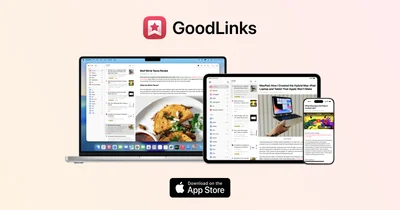
https://goodlinks.app/GoodLinks is a well-designed native read-later app for the Apple ecosystem with a one-time purchase.
GoodLinks is a polished read-later application built exclusively for the Apple ecosystem, offering a seamless native experience across Mac, iPhone, and iPad with a single App Store purchase. The reader view extracts article text and removes advertisements, presenting content in a clean environment with fully adjustable font, size, and spacing. Highlights can be color-coded across multiple colors and annotated with notes, all collected in a per-article notebook view for easy review. Saved content is organized with tags and starred articles, and comprehensive search covers titles, authors, descriptions, and full article content. iCloud Sync keeps everything including reading position, highlights, tags, and article content consistent across all Apple devices without requiring a separate account. Custom actions let users build their own export workflows in Markdown or other formats, with deep integration into Apple Shortcuts and AppleScript. Focus Filters allow configuring which tagged content appears during specific Focus modes. GoodLinks supports logging into paywalled sites for full article access and handles paywalled content gracefully. Privacy is absolute: no tracking, no data collection, and nothing shared externally unless the user explicitly chooses to share.
Why look for GoodLinks alternatives?
The main reason people look past GoodLinks is platform lock-in: no Android, no full web app, and no sharing or collaboration. Anyone switching between Apple, Windows and Android needs a cross-platform option.
Linkflare vs GoodLinks
| Feature | Linkflare | GoodLinks |
|---|---|---|
| Platforms | Web, desktop PWA, iOS, Android, and extensions for Chrome, Edge, Firefox & Safari | iOS & macOS only |
| Content types | Articles, videos (with transcripts), PDFs, books, movies, recipes, products, places & games | Articles & links (text reading focus) |
| Reading mode | Distraction-free reader with themes, fonts & offline access | Clean native reader with offline |
| Organization | Hierarchical tags, collections, saved smart filters & full-text search | Tags, highlights, Shortcuts |
| Beyond bookmarking | Trip planning with maps, meal planning, movie-night voting, shared wishlists, knowledge cards & spaced-repetition review | Reading & tagging only |
| Pricing | Generous free tier; Pro under $5/month | One-time purchase (Apple only) |
| Data export | One-click export of your whole library: every link as CSV, knowledge cards as JSON | Export supported |
Best GoodLinks Alternatives
- 1

Linkflare is the universal bookmark manager that goes beyond saving links. It helps you consume, plan, and act on your saved content with smart metadata for books, movies, recipes, and more. Features include trip planning with map views, meal planning, movie night voting, shared wishlists, distraction-free reading, and hierarchical tags. Available on every platform with browser extensions, mobile apps, and a PWA for desktop.
Try Linkflare Free - 2
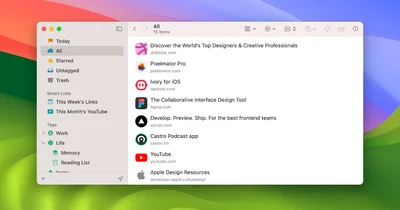
Anybox is a native Apple bookmark manager for Mac, iPhone, and iPad with powerful organization through nested tags, smart lists, iCloud sync, and Quick Find overlay. Users can archive bookmarks as PDFs or web archives and automate workflows via Siri Shortcuts, AppleScript, and integrations with Raycast and Alfred. Privacy is guaranteed as all data syncs via iCloud with no personal data collection.
Visit Anybox - 3
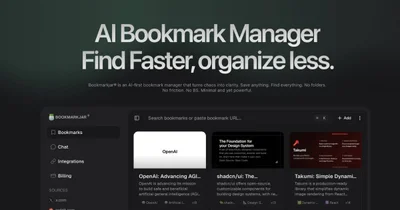
Bookmarkjar is an AI-first bookmark manager that drops folders in favor of automatic summaries, auto-tagging and semantic search. Every link you save gets a short AI summary and tags, and you find it again by asking in plain language. It also pulls in saves from X, Reddit and GitHub, and runs an MCP server so assistants like Claude and ChatGPT can query your library directly.
Visit Bookmarkjar - 4

Diigo is a research-focused bookmarking platform that combines link saving with web annotation, sticky notes, and collaborative group sharing for over 9 million users. It lets you highlight text directly on any web page or PDF and leave persistent sticky notes visible on future visits. Its Outliner feature structures research into organized knowledge bases, making it popular in academic and professional settings.
Visit Diigo - 5
Instapaper is one of the original read-later apps, allowing users to save any web content with one click for distraction-free offline reading on any device. It strips away ads and clutter from saved articles, delivering a clean reading experience with adjustable fonts and sizes. Highlights and comments let users capture key passages for future reference.
Visit Instapaper - 6
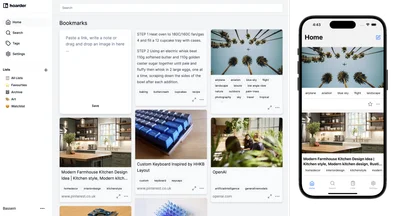
Karakeep is an AI-powered bookmark manager built for data hoarders, with automatic tagging, RSS feed auto-ingestion, self-hosting via Docker, and collaborative shared lists. It supports saving links, notes, images, and PDFs, all with full-text search for instant retrieval. With over 22,000 GitHub stars, it has become a beloved open-source tool in the personal knowledge management community.
Visit Karakeep - 7
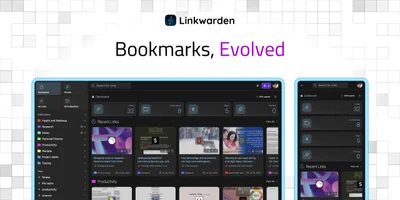
Linkwarden is an open-source bookmark manager built around full-page preservation, saving every link as complete HTML, screenshots, and PDFs to prevent link rot permanently. A dedicated reader view supports text highlighting and annotations for distraction-free content consumption. AI-powered automatic tagging, RSS feed subscription, and collection sharing make it a powerful all-around bookmarking platform.
Visit Linkwarden - 8
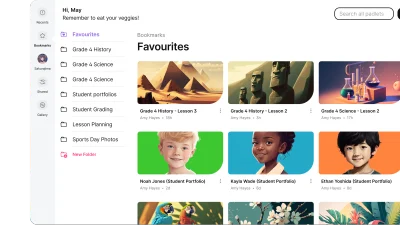
Padlet is a collaborative board where a class or a team posts links, files, images, video and audio onto one shared wall. Boards can be laid out as a wall, grid, columns, table, timeline, stream, map or freeform canvas, and anyone with the link can contribute without creating an account. It is used by over 40 million people, overwhelmingly in classrooms, and its free plan caps you at three boards.
Visit Padlet - 9
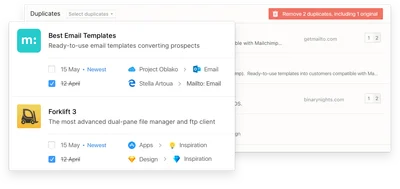
Raindrop.io is a polished all-in-one bookmark manager designed for creatives and coders alike, featuring collections, tags, full-text search across saved pages, and permanent page preservation. It offers highlights, instant in-app content previews, and cross-platform access on web, desktop, and mobile. With a generous free tier and a clean open-source ethos, it has become one of the most popular bookmark managers available.
Visit Raindrop.io - 10

Readwise helps readers retain and revisit ebook and article highlights using spaced repetition, syncing highlights from Kindle, Instapaper, iBooks, and more into one place. Daily email digests resurface your best highlights at the right intervals, helping build lasting knowledge over time. Deep integrations with Notion, Evernote, Obsidian, and Roam Research make it a central hub for any knowledge management workflow.
Visit Readwise - 11
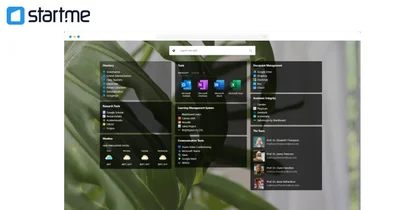
Start.me is a customizable browser start page that centralizes bookmarks, live RSS feeds, and over 50 widgets in one personalized productivity dashboard. Used by over 350,000 people and teams, it replaces the browser's new tab with an organized hub for all daily web tools. Teams can collaborate in real time on shared pages, and the platform is popular in OSINT, education, and cybersecurity research communities.
Visit Start.me - 12
Symbaloo is a visual start page that turns bookmarks into a grid of clickable tiles grouped into themed webmixes. Schools and libraries use it as a class homepage, because a published webmix can be embedded on a site or set as the new tab for a whole cohort. It claims over 18 million users, and its free tier is ad-supported.
Visit Symbaloo
Ready to try the best GoodLinks alternative?
Linkflare goes beyond bookmarking. Plan trips, share wishlists, organize recipes, and never lose a link again. Get started for free today.
Frequently Asked Questions
Is Linkflare a good GoodLinks alternative?
Does Linkflare work on Android and Windows?
Can I share collections in Linkflare?
More on bookmark management
Bookmark Manager: The Complete Guide to Organizing Your Links
Open tabs pile up faster than anyone reads them. A bookmark manager saves those links, sorts them and finds them again months later. Here is how to set one up.
Free Bookmarks HTML Viewer
Open, inspect, deduplicate and convert a browser bookmarks export without uploading it.
Best Bookmark Managers in 2026
We tested more than 20 bookmark managers and picked the ones worth using in 2026, with notes on who each one suits best.
AI Bookmark Manager: What AI Actually Does in 2026
Nearly every bookmark manager claims to be AI-powered. Here is what AI genuinely does today: metadata extraction, classification, summaries, tagging, dedup and semantic search. What is hype, and how to test a claim in fifteen minutes.