Plan Your Next Trip with Location-Aware Bookmarks
Save restaurants, hotels, museums, and scenic spots from anywhere on the web. Linkflare auto-detects locations and shows all your saved places on an interactive map — turning scattered links into a visual itinerary.
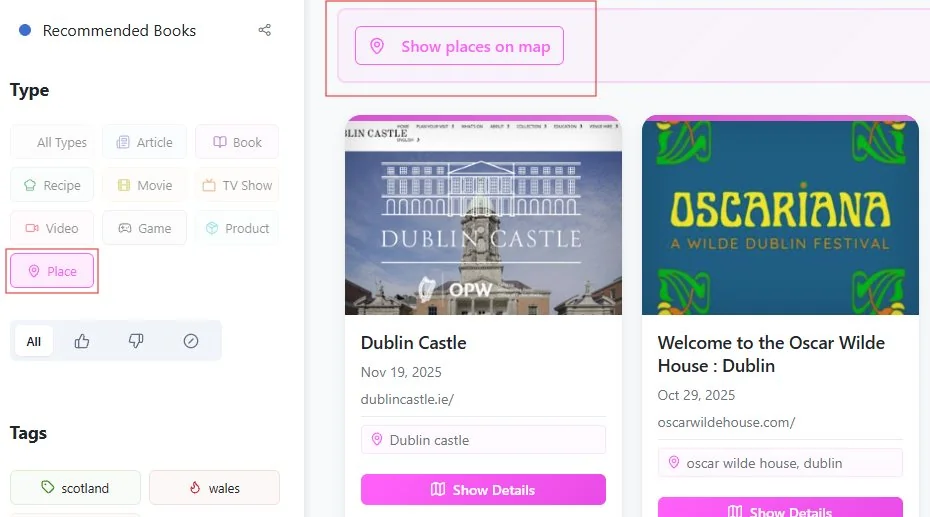
See Your Trip Come to Life on a Map
Bookmark places from any website and watch your itinerary build itself.
Everything You Need to Plan a Trip
From researching to itinerary building to sharing with travel companions.
Bookmark Places on a Map
Save restaurants, hotels, museums, viewpoints — anything with a location. Linkflare auto-detects coordinates and shows them on an interactive map.
Interactive Map View
Switch to map view and see all your saved places visualized. Zoom into a neighborhood, plan your walking route, and see what's near what.
Location-Aware Metadata
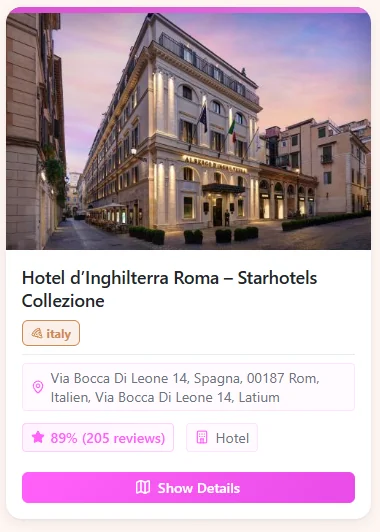
Places you bookmark get enriched with coordinates, ratings, reviews, and photos. See everything at a glance without opening a dozen tabs.
Organize by Trip
Create a collection per trip — "Scotland 2026", "Japan Spring". Each collection becomes a self-contained itinerary with all your saved places.
Share Trip Plans
Share a collection link with travel companions. They see the map, the places, and your notes. Updates are live — add a new restaurant and everyone sees it.
Works Offline
Traveling without internet? Your saved places, notes, and details are cached on your device. Plan from anywhere — even on a plane.
Smart Place Bookmarks with Real Data
When you save a place, Linkflare enriches it with coordinates, ratings, reviews, and photos. No more copying addresses into spreadsheets — everything is attached to the bookmark.
- ✓ Automatic coordinates from Google Maps, TripAdvisor, Yelp links
- ✓ Ratings and review summaries at a glance
- ✓ Tag places by type: "Food", "Stay", "Must-See", "Day Trip"
- ✓ Add notes like "open until 6pm" or "book ahead"
How It Works
Save places
Bookmark from Google Maps, TripAdvisor, Yelp, Airbnb, or any website. Linkflare detects the location and pulls coordinates.
See the map
Open your trip collection and switch to map view. All your saved places appear as pins you can click for details.
Organize & tag
Tag places by type: "Food", "Museum", "Hotel", "Scenic". Filter the map to show only restaurants or only attractions.
Share & go
Share the collection with your travel companions. Use it as a live itinerary that everyone can contribute to.
"Planning my trip to Japan was a breeze. Saving places and seeing them on a map with coordinates made creating an itinerary so much easier than using spreadsheets."
Alex R.
Trip Planner — FAQ
How does Linkflare get the location of a place?
Linkflare extracts coordinates from the page metadata (schema.org, Open Graph, or embedded maps). For popular services like Google Maps, TripAdvisor, and Yelp, the location is extracted automatically. You can also manually add or adjust coordinates for any bookmark.
Can I see all my saved places on a map?
Yes. When you filter by the Place type or open a trip collection, you can switch to map view. All bookmarked places appear as pins on an interactive map. Click a pin to see the place details, rating, and your notes.
Can I plan a multi-city trip?
Absolutely. Create a collection per city or per trip, and tag places by day or category. Each collection has its own map view, so you can zoom into individual cities. Or view all collections at once for the full trip overview.
Can I share trip plans with my travel companions?
Yes. Share a collection via link — anyone with the link sees the map, all your saved places, and your notes. They don't need a Linkflare account. If you share a collaborative collection, others can add places too.
Does it work offline?
Yes. Linkflare is a PWA (Progressive Web App) that caches recently viewed content. Your saved places, notes, and details are available offline. The interactive map requires an internet connection, but your place list and details work without it.
Can I import places from Google Maps?
You can bookmark Google Maps links and Linkflare will extract the location. For bulk import, export your Google Maps saved places via Google Takeout and import the URLs into Linkflare.
Other Ways People Use Linkflare
Learn more: Trip Planning Docs · Bookmark Types · Share Collections · Browser Extension