Track Books You've Read, Want to Read, and Love
Your reading list deserves better than a Goodreads account you never check. Save books from anywhere, get automatic metadata, and share your recommendations with a live link that always stays up to date.
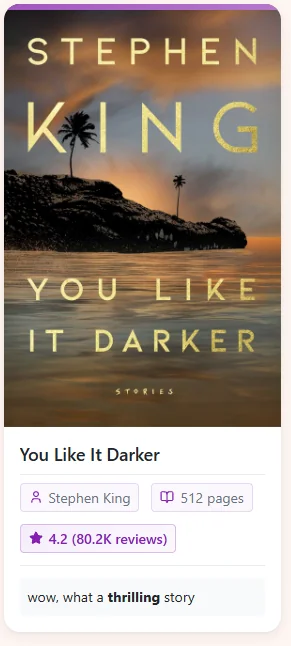
Share Your Book Recommendations
Create collections and share always-up-to-date lists with friends.
Everything a Book Tracker Should Do
From discovery to recommendation sharing.
Automatic Book Metadata
Save a book from Amazon, Goodreads, or any bookstore and Linkflare fetches the author, page count, cover, genre, and rating automatically.
Track What You've Read
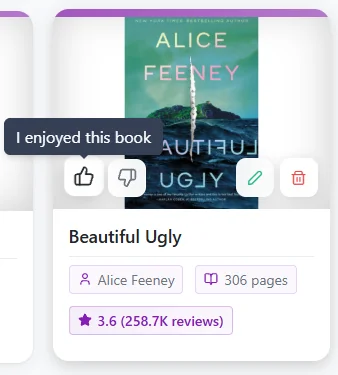
Rate books after finishing them. Filter your library to see only books you loved, haven't rated yet, or want to read next.
Share Book Recommendations
Create a "Best Books of 2026" collection and share a live link. Friends see your recommendations with covers, ratings, and your notes — always up to date.
Import from Goodreads
Export your Goodreads library as CSV and import it directly into Linkflare. Your shelves, ratings, and books come along for the ride.
Read Articles About Books
Save book reviews, author interviews, and reading lists alongside your books. Read them distraction-free in Linkflare's reader mode.
Organize by Shelf, Genre, or Mood
Use collections for shelves ("To Read", "Favorites") and tags for genres. Combine filters to find exactly what to read next.
Import Your Entire Goodreads Library
Already have a reading list on Goodreads? Export your library as CSV and import it into Linkflare in seconds. Your books will be enriched with cover images, page counts, and metadata automatically.
- ✓ One-click import from Goodreads CSV export
- ✓ Also import from Chrome, Raindrop, Pocket, and Instapaper
- ✓ Books are auto-enriched with smart metadata after import
- ✓ Export anytime — no vendor lock-in
How It Works
Save a book
Bookmark from Amazon, Goodreads, or any bookstore. Or import your entire Goodreads library in one click.
Get book details
Author, cover, page count, rating, and genre are fetched automatically. No manual typing required.
Organize your library
Tag by genre, mood, or any category. Create collections like "To Read", "2026 Reads", or "Book Club."
Share & recommend
Share collections as live links. Your book recommendations stay up to date as you add new finds.
Book Tracker — FAQ
Can I import my Goodreads library into Linkflare?
Yes. Export your Goodreads library as a CSV file, then upload it to Linkflare. Your books, shelves, and reading status will be imported. Linkflare will also enrich each book with additional metadata like covers and page counts.
What book metadata does Linkflare fetch?
Linkflare automatically fetches the book title, author(s), cover image, page count, genre, publication year, and average rating. This data comes from the Big Book API and works for millions of titles.
Can I track my reading progress?
Yes. Linkflare tracks your reading progress for articles and web pages with a progress bar and "continue reading" feature. For books, you can use the rating and notes system to log when you finished and what you thought.
How do shared book lists work?
Create a collection (e.g., "My Top 10 Books"), add your favorite books, and share it via a link. Anyone with the link can browse your list with covers, ratings, and descriptions — no Linkflare account needed. The list stays live, so when you add or remove books, the shared page updates automatically.
Is Linkflare a Goodreads replacement?
Linkflare replaces the "tracking" and "listing" side of Goodreads — saving books, organizing by shelf, sharing recommendations. It doesn't have Goodreads' social review community, but it adds things Goodreads can't do: saving movies, recipes, articles, travel spots, and wishlists alongside your books, all in one app.
Can I rate books in Linkflare?
Yes. Every bookmark, including books, can be rated with thumbs up (loved it), thumbs down (not for me), or no rating. You can then filter your library to see only your favorites.
Other Ways People Use Linkflare
Learn more: Bookmark Types · Reader Mode · Import from Goodreads · Share Collections
Your reading list deserves a proper home
Track what you've read, plan what's next, and share what you love.
Start Tracking Books — Free